
The Site Map, just like the Menu, provides links to the various areas of the site and is arranged by topicarranged by topic. The second level navigation pages are listed below the main headings under which they are organized. The third level navigation pages are indented below the second level items under which they are organized. The Site Map displays links to all pages of ExponentHR "at a glance." You may use it to navigate to any page in ExponentHR. You may also use the Site Map to specify which Quick Links you would like to appear on your Menu option and through the Site MapSite Map button that appears in the Utility Bar. See below.
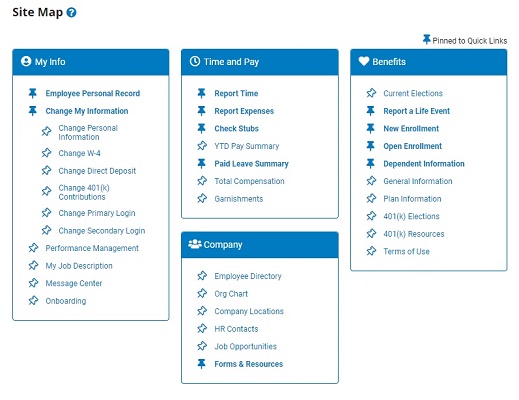
To navigate to a page using the Site Map:
1. On the Utility Bar, click the Site MapSite Map button.
The Site MapSite Map page displays.
2. On the Site Map, click the thumbtackthumbtack icon next to the Web page to activate or deactivate a link for it.
 = Activated
 = Deactivated
Result: The page you selected will be added your Quick Links list.
3. On the Site Map, click the ExponentHR page you would like to view.
Result: The page you selected displays.
Note: Both the Menu and Site Map allow you to access the exact same pages. The only difference between the two is how they are organized.
Related Help Topic: